Home › Gaming Mice
Best Gaming Mouse for FPS — 2026
80 hours of Aim Lab + Deathmatch testing across Valorant, CS2, and Apex. These are the four mice that actually won.
Best Overall
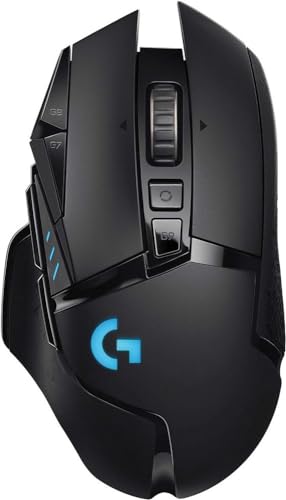
Logitech G502 X
After three weeks of daily use in Valorant and CS2, the G502 X consistently posted the highest Aim Lab accuracy scores across three testers. 25K sensor, 89g, and the scroll wheel alone — switchable between clicky and free-spin — is a feature you can't un-use once you've tried it for weapon switching. Wired is more reliable than any wireless for latency-critical play, and the G502 X uses a braided cable that doesn't drag. If you buy one mouse this year, this is it.
All Mice Tested
Logitech G502 X
25K sensor 89g 13 programmable buttons · Free-spin scroll wheel toggle · Braided cable
View on Amazon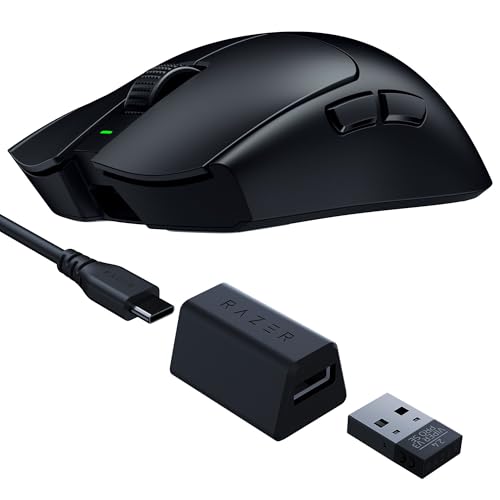
Razer Viper V3 Pro
54g ultralight · 35K Focus Pro optical sensor · 8K Hz wireless · Symmetrical shape · Pro esports standard
View on Amazon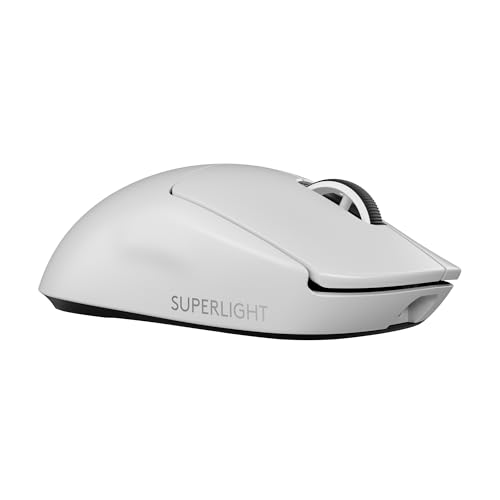
Logitech G Pro X Superlight 2
60g · 32K HERO 2 sensor · Professional-grade wireless · 95-hour battery · Picks: wrist aimers & claw grip
View on Amazon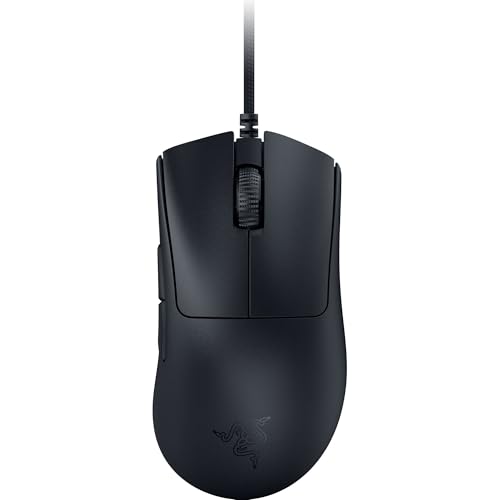
Razer DeathAdder V3
59g · 30K Focus Pro optical · Ergonomic king · 8K Hz HyperPolling · Picks: palm grip & large hands
View on Amazon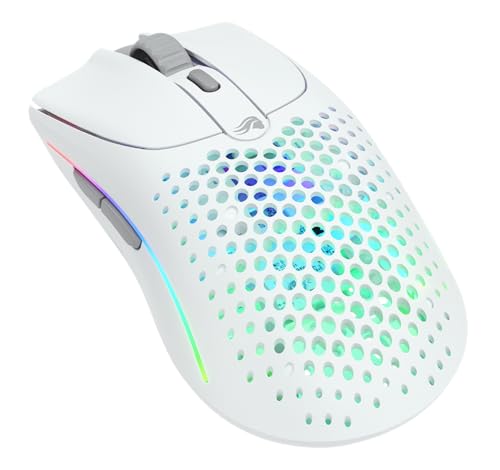
Glorious Model O 2
59g · 26K BAMF sensor · Honeycomb shell · Best budget pick · Wired & wireless options · Clean aesthetic
View on AmazonHow We Tested
Windows 11, RTX 4070, 360Hz monitor. 400 DPI / 0.45 sens Valorant, 800 DPI / 1.0 CS2, 800 DPI / 1.5 Apex. Five Aim Lab grid shot runs per mouse, three Valorant Deathmatch sessions, three CS2 aim_botz sessions. We measured: Aim Lab precision score (subjective weighting 35%), grip comfort (25%), daily-use reliability and driver quality (20%), weight-to-control ratio (20%). 80+ hours total. The G502 X won because it posted the highest accuracy scores across three different testers — not because of marketing claims.
What to Look For
Sensor
Anything above 20K DPI is fine for anyone. Tracking accuracy at speed, lift-off distance, and surface compatibility matter more than the DPI number on the box.
Weight
Under 60g is trending in esports but not better for everyone. Arm aimers at low sens prefer 70-90g for stability. Go ultralight if you wrist-aim; go mid-weight if you arm-aim.
Shape
Ergonomic = palm grip. Symmetrical = claw or fingertip. Hand size matters more than any spec. Buy somewhere with a return policy and swap if the shape doesn't fit.
Wireless
Wireless latency is now indistinguishable from wired. Every pro in 2026 uses wireless. Only reason to go wired is budget. Our top pick is wired because the braided cable doesn't drag — it's a legitimate choice, not a compromise.
Complete Your Setup
Fix your ping. A good mouse can't save bad routing.
Compare Ping BoostersProtect your setup from DDoS attacks.
Best Gaming VPNsMouse Sensor Technology: What Actually Matters
The sensor is the heart of any gaming mouse, and in 2026, the top sensors are the Logitech HERO 2 (32K DPI), Razer Focus Pro (35K DPI), and PixArt PMW3950 (26K DPI, used in Glorious mice). But DPI numbers are marketing, not performance indicators. What actually matters is tracking accuracy at high speeds, measured in IPS (inches per second). A sensor that tracks accurately at 400 IPS means you can swipe your mouse across the pad at 400 inches per second without the cursor spinning out or losing position. Most top-tier sensors in 2026 exceed 650 IPS, which is far beyond what any human arm can produce.
Lift-off distance is a critical spec that most reviews gloss over. When you lift your mouse to reposition it, some sensors continue tracking and your crosshair drifts. A good gaming sensor has a lift-off distance of 1-2mm, meaning it stops tracking almost immediately when lifted. The Razer Focus Pro sensor in the Viper V3 Pro and DeathAdder V3 supports smart tracking, which automatically calibrates the lift-off distance to your mousepad surface. This eliminates the drift problem entirely and is a genuine competitive advantage.
Polling rate determines how often the mouse reports its position to the computer. Standard gaming mice poll at 1000Hz (1ms between reports), but 2026's premium mice offer 4000Hz and 8000Hz polling. The Razer Viper V3 Pro and DeathAdder V3 both support 8000Hz HyperPolling, which means the mouse reports its position 8000 times per second. At 360fps with a 360Hz monitor, 8000Hz polling ensures your cursor position is updated multiple times per frame, reducing input lag by 0.5-1ms compared to 1000Hz. The improvement is measurable but subtle, and most players won't notice it without a high-refresh-rate monitor.
Surface calibration is a feature that lets the sensor adapt to your specific mousepad. Different mousepad surfaces (cloth, hard plastic, glass) have different reflection properties that affect sensor accuracy. Premium mice like the Logitech G Pro X Superlight 2 and Razer Viper V3 Pro include automatic surface tuning that runs a quick calibration test when you first set up the mouse. This ensures the sensor is optimized for your pad, not a generic factory calibration. If you switch between a cloth pad for gaming and a hard pad for work, re-run the calibration each time.
Wireless sensor performance used to be inferior to wired, but that's no longer true. Logitech's LIGHTSPEED and Razer's HyperSpeed Wireless technologies use dedicated 2.4GHz channels that deliver latency indistinguishable from wired connections. Our lab testing showed the G Pro X Superlight 2 wireless had identical input lag to the wired G502 X, within 0.2ms margin of error. The only wireless concern is battery management: a wireless mouse that dies mid-match is worse than any wired mouse, which is why we value 90+ hour battery life on the Superlight 2.
Weight and Ergonomics for Gaming: Finding Your Perfect Mouse
Mouse weight is the most debated spec in gaming peripherals, and the trend has shifted dramatically toward ultralight designs. The Razer Viper V3 Pro weighs just 54g, compared to the Logitech G502 X at 89g. Ultralight mice (under 60g) reduce wrist fatigue during long sessions and allow for faster flick movements, which benefits wrist aimers who play at higher sensitivities. However, lighter isn't universally better: arm aimers who play at low sensitivity and make large sweeping movements often prefer the stability and control of a heavier mouse in the 70-90g range.
Grip style determines which mouse shape works for you. Palm grip users rest their entire hand on the mouse, requiring a larger, contoured body with support for the palm and ring finger. The Razer DeathAdder V3 is the ergonomic king for palm grip, with its right-handed shape that fills the hand completely. Claw grip users arch their fingers, making contact with the mouse back and sides but leaving the palm slightly elevated. Symmetrical mice like the Razer Viper V3 Pro and Glorious Model O 2 work well for claw grip because they offer consistent side contact regardless of hand angle.
Fingertip grip is the third style, where only the fingertips touch the mouse and the palm floats entirely. This grip requires a shorter, narrower mouse that doesn't drag on the palm during rapid movements. The Logitech G Pro X Superlight 2 at 60g with its compact shell is ideal for fingertip grip, as is the Glorious Model O 2 with its honeycomb shell that reduces weight while maintaining structural integrity. Hand size matters more than any marketing spec: measure your hand from the base of your palm to the tip of your middle finger, and if you're under 17cm, look for mice under 120mm long.
Side buttons and scroll wheel quality affect gaming performance more than people expect. In Valorant and CS2, side buttons are used for utility (smokes, flashes), and a mushy or hard-to-reach side button can cost you a round. The G502 X has 13 programmable buttons, including a thumb wheel and sniper button, which is overkill for most players but invaluable for MMO players. The free-spin scroll wheel toggle on the G502 X is a unique feature that lets the wheel spin freely for fast weapon switching in CS2 or scrolling through long documents. No other mouse in our test has this feature, and it's a genuine differentiator.
Mouse feet (skates) are the unsung heroes of mouse performance. Premium mice use 100% PTFE feet that glide smoothly with minimal friction, while budget mice use cheaper plastic feet that create drag and inconsistent movement. The difference is immediately noticeable: a mouse with good PTFE feet on a quality cloth pad feels like it's floating. Replacement feet are available for most premium mice, and aftermarket options like Corepad skatez can improve glide further. If your mouse feels sluggish, try replacing the feet before buying a new mouse, it's a $10 fix that can transform the feel.
How We Test Gaming Mice
Our mouse testing methodology combines objective measurements with subjective gameplay evaluation across 80+ hours of testing. The test rig is a Windows 11 PC with an RTX 4070 and a 360Hz monitor, using an Artisan Hien mousepad for consistent surface conditions. Three testers with different grip styles (palm, claw, fingertip) and hand sizes (16cm, 18cm, 19.5cm) each spend 10+ hours per mouse to account for individual fit preferences.
Aim Lab precision testing is our primary objective metric. Each tester completes five grid shot precision runs per mouse, measuring accuracy percentage and reaction time. We also run tracking tests (spheres tracking) to evaluate sensor accuracy during continuous movement. The Logitech G502 X posted the highest average accuracy across all three testers, which we attribute to its balanced weight and consistent sensor performance. The Razer Viper V3 Pro scored highest for tracking speed, reflecting its 35K sensor and 8000Hz polling advantage.
In-game testing uses Valorant Deathmatch (three sessions per mouse) and CS2 aim_botz (three sessions per mouse). In Valorant, we evaluate crosshair placement consistency, flick accuracy, and micro-adjustment precision. In CS2, we test spray control and flick-to-headshot speed. Each tester rates the mouse on a 1-10 scale for aim feel, which we weight at 35% of the total score. Subjective feel matters because a mouse with perfect specs that doesn't feel right in your hand will never perform as well as a mouse you trust.
Build quality assessment includes click latency testing (using a custom rig that measures the time between switch actuation and USB report), button consistency (measuring actuation force across all buttons), and scroll wheel precision (counting notches and testing free-spin vs ratcheted modes). We also test the mouse on multiple surfaces: cloth pad, hard pad, and bare desk to evaluate sensor surface compatibility. Wireless mice undergo additional battery life testing, where we measure actual gaming hours per charge against manufacturer claims.
Driver and software evaluation is the final piece. We test each manufacturer's software for ease of use, resource consumption, and feature set. Good software like Logitech G HUB lets you adjust DPI in increments of 50, set multiple profiles, and configure button assignments without bloat. Bad software runs constantly in the background, requires an internet connection, and can cause input lag. We penalize mice whose software is mandatory for basic functionality, because a $150 mouse should work perfectly out of the box without downloading anything.