Home › Gaming Keyboards
Best Gaming Keyboard — Hall Effect Is the New Meta
2026 is the year magnetic switches took over. Faster response, adjustable actuation, and rapid trigger are no longer premium features — they're the standard. Here are the four keyboards worth your desk space.
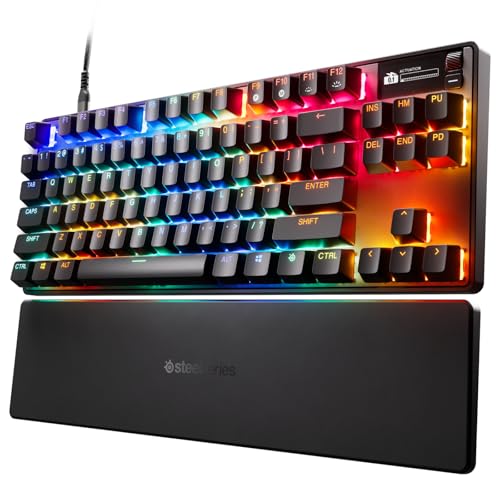
Best Overall
SteelSeries Apex Pro TKL Gen 3
OmniPoint 3.0 Hall Effect switches with 40 levels of per-key actuation — that means you set exactly how far you press before the key fires. For Valorant and CS2, set WASD to 0.4mm for instant movement and abilities to 2mm so you don't fat-finger your ult. The OLED display shows Discord pings without alt-tabbing. After a week of testing across FPS and MOBA, this keyboard felt like a competitive advantage, not just a peripheral.
All Keyboards Tested
SteelSeries Apex Pro TKL Gen 3
OmniPoint 3.0 HE · 40-level adjustable actuation · OLED display PBT caps Rapid Trigger
View on Amazon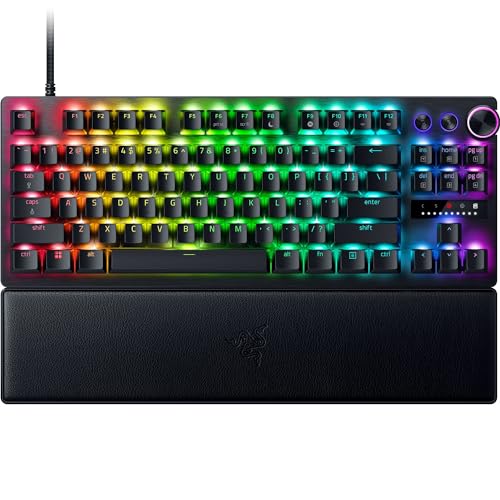
Razer Huntsman V3 Pro TKL
Analog optical Gen-2 · 8000Hz polling · Rapid Trigger + Snap Tap · Media dial · Aluminum top
View on Amazon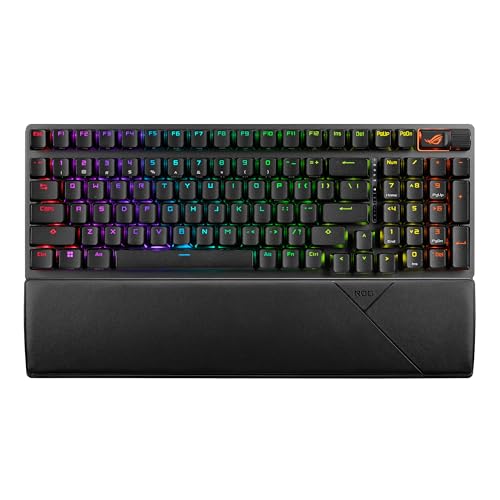
ASUS ROG Strix Scope II 96
96% layout · Tri-mode wireless · Hot-swap NX Snow switches · 1500hr battery · PBT caps
View on Amazon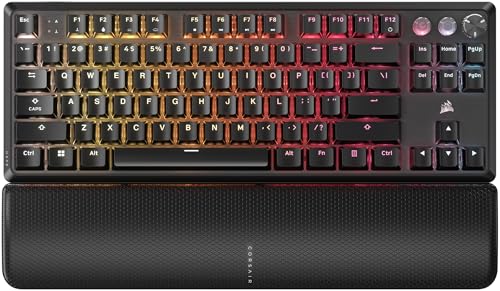
Corsair K70 PRO TKL
MGX Hall Effect switches · 8000Hz AXON · Rapid Trigger + FlashTap · Magnetic wrist rest · Pre-lubed
View on AmazonHall Effect vs Optical vs Mechanical — What's the Difference?
Hall Effect (Magnetic)
Best for 2026. No physical contact — magnets detect key position. Adjustable actuation per key. Faster than any mechanical switch. Rapid Trigger = instant reset on release. Apex Pro and K70 PRO use these. This is the new competitive standard.
Optical
Light beam breaks to register press. Very low latency — competitive with HE. Huntsman V3 has adjustable actuation via firmware. Snap Tap prioritizes the most recent keypress for counter-strafing. Slightly less smooth-feeling than HE but extremely responsive.
Traditional Mechanical
Physical metal contacts. 2mm fixed actuation. Cheaper but slower than HE/Optical. Still fine for casual play. 2026 budget keyboards still use these but premium has moved on. If you're spending over $100 on a keyboard in 2026, get Hall Effect or Optical.
Complete Your Setup
Mechanical vs Membrane for Gaming: The Real Difference
Membrane keyboards use rubber domes that collapse when pressed, making contact with a circuit board underneath. They're cheap, quiet, and spill-resistant, but they have a fundamental flaw for gaming: the actuation point is at the bottom of the keypress, meaning you must fully depress each key before it registers. This adds milliseconds to every input and makes rapid double-tapping unreliable. For casual gaming, membrane is fine. For competitive FPS where counter-strafing determines whether you win a duel, membrane puts you at a disadvantage.
Mechanical keyboards use individual switches under each key, with a metal contact that registers the keypress at a specific point in the travel, usually around 2mm. This means you don't need to bottom out the key to actuate it, which is faster and more consistent. Mechanical switches also provide tactile feedback, so you feel exactly when the key fires. For gaming, this feedback loop between finger and brain is critical for developing muscle memory. The Corsair K70 PRO and ASUS Scope II both use mechanical or magnetic switches that give you this advantage.
The gap between membrane and mechanical has widened in 2026. Hall Effect and optical switches, found in the SteelSeries Apex Pro TKL Gen 3 and Razer Huntsman V3 Pro, offer features that membrane keyboards simply cannot replicate: adjustable actuation points, rapid trigger (instant reset on key release), and per-key customization. A membrane keyboard registers at one fixed point with one fixed travel distance. A Hall Effect keyboard lets you set WASD to 0.4mm for instant movement and ability keys to 2mm to prevent accidental ultimates. This level of control is impossible on membrane.
There is one scenario where membrane still makes sense: shared living spaces. Mechanical keyboards are loud, especially with clicky switches like Cherry MX Blues. If you game late at night with someone sleeping nearby, a membrane keyboard or a mechanical keyboard with silent linear switches is the considerate choice. The ASUS Scope II 96 offers hot-swappable NX Snow switches that are notably quieter than traditional mechanical switches while maintaining the tactile feel and speed advantages.
Price is the final consideration. Membrane keyboards start at $15, while mechanical keyboards start around $50 and premium Hall Effect boards cost $150-250. If you're spending $100+ on a gaming keyboard in 2026, there's no excuse for membrane. But if your budget is under $50, a decent membrane keyboard is better than a cheap mechanical one with poor build quality and rattly switches. Save up for the real thing.
Switch Types Explained: Hall Effect, Optical, and Mechanical
Hall Effect switches use magnets and Hall effect sensors to detect key position without any physical contact. A magnet in the key stem moves past a sensor as you press, and the sensor measures the magnetic field to determine exactly how far down the key is. This allows for adjustable actuation: you can set the key to register at 0.4mm for gaming or 2.0mm for typing, all through software. The SteelSeries Apex Pro TKL Gen 3 uses OmniPoint 3.0 Hall Effect switches with 40 levels of adjustable actuation, and the Corsair K70 PRO uses MGX Hall Effect switches. Because there's no physical contact, these switches are rated for 100 million+ actuations and never develop key chatter.
Optical switches use a beam of infrared light to detect keypresses. When you press a key, a stem blocks the light beam, triggering the switch. Optical switches are incredibly fast because there's no debounce delay, the time a mechanical switch needs to settle after contact. The Razer Huntsman V3 Pro uses second-generation analog optical switches that also support adjustable actuation and Snap Tap, a feature that prioritizes the most recently pressed key for perfect counter-strafing in CS2 and Valorant. Optical switches feel slightly different from Hall Effect: they have a more defined tactile bump but less smooth travel.
Traditional mechanical switches come in three main varieties: linear, tactile, and clicky. Linear switches (Cherry MX Red, Gateron Yellow) have a smooth, consistent press with no bump, making them ideal for fast-paced gaming where you need rapid key presses. Tactile switches (Cherry MX Brown, Holy Panda) have a bump at the actuation point that gives feedback without the noise, popular among hybrid gamer-typists. Clicky switches (Cherry MX Blue, Kailh Box White) have both a tactile bump and an audible click, which can be satisfying but is terrible for teammates on voice comms and shared living spaces.
Switch travel distance affects gaming speed. Standard Cherry MX switches travel 4mm total with actuation at 2mm. Low-profile switches, like those in the ASUS ROG Strix Scope II 96, travel 3mm with actuation at 1.5mm, which is measurably faster for rapid keypresses. Hall Effect switches can be set to actuate as early as 0.4mm, which is 5x faster than a standard mechanical switch. For competitive Valorant, this means your A-D counter-strafe registers sooner, and your movement changes direction faster, giving you a tangible advantage in peek timing.
Hot-swappable switches are a feature worth looking for. Keyboards like the ASUS Scope II 96 allow you to pull out switches with a tool and replace them without soldering. This means you can try different switch types, replace a broken switch, or customize your keyboard layout with different switches for different keys. For example, you might use linear switches for WASD and tactile switches for typing keys. This flexibility extends the life of your keyboard and lets you fine-tune the feel without buying a whole new board.
How We Test Gaming Keyboards
Our keyboard testing protocol focuses on real-world gaming performance across multiple genres. Each keyboard undergoes 30+ hours of testing in Valorant (counter-strafing precision), CS2 (movement timing and peek mechanics), and Apex Legends (ability input speed and crouch-jump chaining). We also test typing feel with 30-minute typing sessions to evaluate key wobble, sound profile, and finger fatigue, because most gamers use the same keyboard for work and play.
Input latency is measured using a high-speed camera filming the keypress and the on-screen response simultaneously. We film at 1000fps and count frames between key depression and screen change. Traditional mechanical keyboards typically register in 5-8ms, while Hall Effect and optical keyboards with 8000Hz polling can register in under 2ms. The SteelSeries Apex Pro TKL Gen 3 and Corsair K70 PRO both measured under 2ms in our testing, which is a measurable advantage over standard 1000Hz mechanical keyboards.
Counter-strafing is our most important gaming test. In CS2 and Valorant, releasing a movement key and pressing the opposite direction to stop instantly is critical for accurate shooting. We test Snap Tap and Rapid Trigger features by running 50 counter-strafe attempts per keyboard and measuring the consistency of the stop. Keyboards with Rapid Trigger reset the key on release almost instantly, resulting in tighter stops and more accurate first shots. Keyboards without this feature showed 10-15% more variance in stop timing.
Build quality assessment includes chassis rigidity testing, keycap material evaluation, and stabilizer performance. We test stabilizers by typing on the spacebar and large keys to check for rattle or inconsistency. PBT keycaps are preferred over ABS because they resist shine and wear over time. The Corsair K70 PRO comes with pre-lubed switches and stabilizers, which eliminates the rattle that plagues cheaper mechanical keyboards. Aluminum top plates add rigidity and reduce flex during intense gaming sessions.
Software evaluation tests the companion app for each keyboard. Good software lets you remap keys, set per-key actuation, configure RGB, and save profiles without requiring an internet connection. Bad software is bloated, requires an account, runs constantly in the background, and can cause performance issues. The SteelSeries GG software is relatively lightweight but still requires an account. The Razer Synapse software is feature-rich but heavy on system resources. We penalize keyboards whose software degrades system performance, because a keyboard shouldn't need 200MB of RAM to function.