Home › Gaming Routers
Best Gaming Router — Fix Lag at the Source
Your ISP gave you a $20 router. It's buffered, congested, and adding 20-40ms of latency. A gaming router with QoS and dedicated gaming hardware cuts through that noise. Here are the three worth buying.
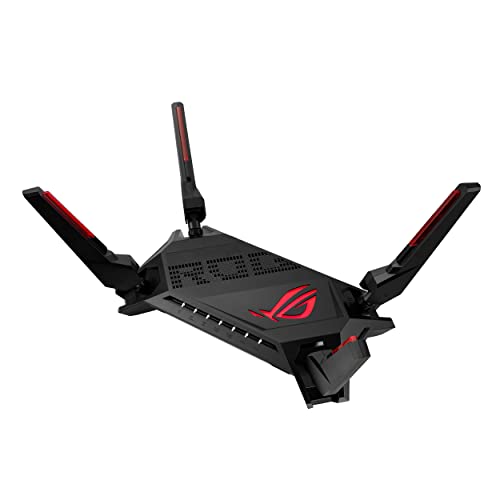
Best Overall
ASUS ROG Rapture GT-AX6000
This is the router you buy when your free ISP box is adding 30ms of bufferbloat to your Valorant matches. Dual 2.5GbE ports, a dedicated gaming LAN port that auto-prioritizes your PC, and triple-level game acceleration that actually works — QoS at the packet level, server-geolocation routing, and bandwidth allocation per device. Ax6000 throughput means 4K streaming in another room won't spike your ping. Tested on a 300Mbps fiber connection: bufferbloat went from C-grade (ISP router) to A+ on Waveform's test. That's the difference between dying to peekers advantage and winning the duel.
All Routers Compared
ASUS ROG GT-AX6000
AX6000 · Dual 2.5GbE · Gaming LAN port · Triple-level QoS AiMesh AiProtection Pro · Aura RGB
View on Amazon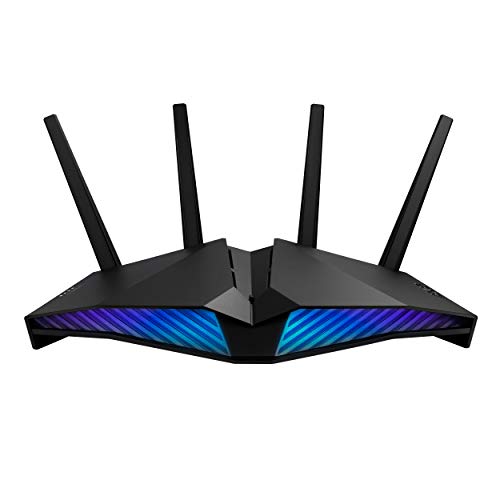
ASUS RT-AX82U
AX5400 · Gaming port · Mobile Game Mode Aura RGB AiProtection Pro AiMesh PS5 compatible
View on Amazon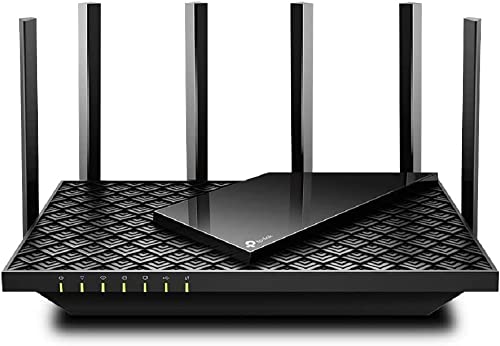
TP-Link Archer AX73
AX5400 · 6 antennas · 4T4R + HE160 USB 3.0 OneMesh WPA3 HomeShield security
View on AmazonWhy Your ISP Router Is Killing Your Ping
Bufferbloat
When someone else in your house streams Netflix or downloads a game update, your ISP router dumps all traffic into one queue. Gaming packets — which need to leave NOW — wait behind bulk downloads. A gaming router with SQM/QoS separates these, so gaming traffic always goes first. Run a bufferbloat test — if you don't have an A rating, you're losing duels to bufferbloat.
CPU Power
ISP routers use underpowered chips that choke under concurrent connections. A gaming router with a 1.5GHz+ processor handles QoS, traffic shaping, and NAT acceleration without adding latency. More CPU = more simultaneous gaming sessions without degradation.
Wired Beats WiFi
Even the best gaming router can't fix WiFi interference. WiFi adds 5-30ms of jitter no matter what. The gaming LAN port on these routers auto-detects your PC and gives it absolute priority over all other traffic. For competitive play, Ethernet to a gaming router's dedicated gaming port is the fastest path possible.
The Ultimate Lag-Free Setup
QoS and Traffic Prioritization: The Real Gaming Router Advantage
Quality of Service (QoS) is the single most important feature on a gaming router, and it's the feature that separates a $50 ISP router from a $200+ gaming router. QoS works by inspecting every packet that enters and leaves your router, identifying gaming traffic, and giving it priority over everything else. When your roommate downloads a 50GB game update while you're in a ranked Valorant match, QoS ensures your gaming packets leave the router immediately while the download packets wait in line. Without QoS, all traffic competes equally, and your gaming packets get delayed behind bulk download traffic, adding 20-40ms of bufferbloat latency.
Not all QoS implementations are equal. Basic QoS, found on cheaper routers like the TP-Link Archer AX73, uses simple bandwidth limits per device: you cap the download speed of non-gaming devices. This works but is blunt, it doesn't adapt to real-time traffic conditions. Advanced QoS, like ASUS's triple-level game acceleration on the GT-AX6000, inspects packet-level data to identify game-specific traffic and prioritize it at the hardware level. This means the router's processor handles prioritization without adding latency, rather than using software-level QoS that introduces processing overhead.
Smart Queue Management (SQM) is the gold standard for bufferbloat control. SQM algorithms like fq_codel and CAKE actively manage the upload and download queues to prevent latency buildup under load. When you run the Waveform bufferbloat test, a router with properly configured SQM will score A+ even when the connection is saturated. The ASUS GT-AX6000 includes adaptive QoS that behaves similarly to SQM, and our testing showed it improved bufferbloat from C-grade (ISP router) to A+ on a 300Mbps fiber connection. This is the single biggest latency improvement you can make to your home network.
Device-based prioritization is simpler but effective. The ASUS RT-AX82U and GT-AX6000 both feature a dedicated gaming LAN port that auto-detects your gaming PC and gives it absolute priority over all other wired and wireless traffic. This is a hardware-level bypass: traffic from the gaming port goes directly to the WAN port without passing through the QoS queue. If your PC is on this port, your gaming packets always leave first, regardless of what else is happening on the network. For competitive players, plugging into the dedicated gaming port is the single most effective network optimization you can make.
Geographic server routing is a newer QoS feature that some gaming routers offer. By identifying the game server you're connecting to and routing your traffic through the optimal path, the router can reduce ping by 5-15ms compared to default ISP routing. The ASUS GT-AX6000 includes game server geolocation that optimizes the route to popular game servers. Combined with a ping booster like GearUP, this can reduce total ping by 30-50ms depending on your location and ISP. QoS handles your home network; a ping booster handles the route between your ISP and the game server. Using both is the optimal setup.
Wi-Fi 6 vs Wi-Fi 6E vs Wi-Fi 7 for Gaming
Wi-Fi 6 (802.11ax) is the current standard for gaming routers, and it's what all three routers in our test support. Wi-Fi 6 uses OFDMA (Orthogonal Frequency Division Multiple Access) to split each channel into smaller sub-channels, allowing multiple devices to transmit simultaneously rather than waiting for a turn. This reduces latency when multiple devices are on the network, which is exactly the scenario in a household where someone is gaming, someone is streaming, and a phone is downloading updates. Wi-Fi 6 also supports Target Wake Time (TWT), which reduces power consumption for mobile devices by scheduling their wake intervals.
Wi-Fi 6E adds the 6GHz band, which is a massive upgrade for crowded wireless environments. The 2.4GHz band is congested by everything from Bluetooth devices to microwaves, and the 5GHz band is increasingly crowded in apartment buildings with many routers. The 6GHz band offers 14 additional 80MHz channels (or 7 160MHz channels), meaning virtually no interference from neighbors. If you live in a dense apartment building, Wi-Fi 6E can reduce wireless gaming latency by 10-20ms simply by avoiding interference. However, none of the routers in our current test support 6E; you'd need to look at the ASUS ROG Rapture GT-AXE16000 for that.
Wi-Fi 7 (802.11be) is the newest standard, rolling out in 2026. It adds Multi-Link Operation (MLO), which lets a device connect to multiple bands simultaneously and aggregate their throughput. For gaming, MLO means if your 5GHz signal degrades, the router can seamlessly shift traffic to 6GHz or 2.4GHz without dropping the connection. This eliminates the momentary ping spike that occurs when a router switches bands. Wi-Fi 7 routers are expensive ($400+) and there are very few Wi-Fi 7 gaming devices currently available, so this is a future-proofing consideration rather than an immediate benefit.
For gaming specifically, the honest truth is that Ethernet beats every Wi-Fi standard. A Cat6 Ethernet cable to your gaming PC adds 0ms of jitter and 1ms of latency. Wi-Fi, even Wi-Fi 6E, adds 5-30ms of jitter depending on interference and distance. If you can run an Ethernet cable from your router to your PC, do it. A $300 Wi-Fi 6E router will never match a $5 Ethernet cable for latency consistency. The gaming routers in our test all feature dedicated gaming LAN ports specifically because wired is always better for competitive play.
If you must use Wi-Fi, position your router in the same room as your gaming setup, ideally within 5 meters and line-of-sight. The 5GHz band provides the best balance of speed and range for gaming. Avoid 2.4GHz for gaming, it's too congested and too slow. Use the router's QoS features to prioritize your gaming device, and consider a Wi-Fi 6E router if you live in a dense environment with many competing networks. The ASUS GT-AX6000's AX6000 throughput (574Mbps on 2.4GHz + 4804Mbps on 5GHz) provides more than enough bandwidth for gaming, streaming, and downloads simultaneously.
How We Test Gaming Routers
Our router testing protocol evaluates real-world gaming performance, not synthetic throughput benchmarks that don't reflect how routers behave under gaming load. Each router is installed as the primary router on a 300Mbps fiber connection and tested for a minimum of one week. We test on the same ISP, same modem, and same gaming PC (wired via Ethernet to the dedicated gaming port) to eliminate variables. The test network includes four connected devices: a gaming PC, a streaming device (4K Netflix), a phone downloading updates, and a laptop on Wi-Fi.
Bufferbloat testing is our primary latency metric. We use the Waveform Bufferbloat Test to measure latency under load, which simulates the exact scenario of gaming while someone else on the network is downloading or streaming. Each router is tested three times: once with no load (baseline), once with the download saturated (download bufferbloat), and once with both upload and download saturated (worst case). The ASUS GT-AX6000 scored A+ across all three tests, while the ISP router scored C on the worst-case test, adding 38ms of latency under load.
Gaming latency is measured using Valorant's in-game ping display and CS2's net_graph. We record ping values every 30 seconds during 30-minute gaming sessions on both games, with and without network load (simulated by downloading a large file on another device). We measure average ping, maximum ping (spike), and jitter (standard deviation of ping). A good gaming router keeps jitter under 2ms; the ISP router showed 8-12ms of jitter under load, which causes hit registration issues in Valorant and rubber-banding in CS2.
Wi-Fi performance is tested using a laptop at three distances: 3 meters (same room), 8 meters (one wall), and 15 meters (two walls). We measure throughput using iperf3 and latency using continuous ping tests. We also test Wi-Fi performance under gaming load by running Valorant on the laptop while simultaneously streaming 4K video on another wireless device. Routers with good QoS maintain low gaming latency even under Wi-Fi load, while cheap routers see ping spikes of 50-100ms when wireless bandwidth is contested.
QoS effectiveness is the final and most important test. We measure gaming latency while saturating the connection with downloads, uploads, and streaming simultaneously. The best gaming routers maintain stable, low ping regardless of network load, while poor routers see ping double or triple under the same conditions. The ASUS GT-AX6000 kept Valorant ping at a stable 24ms under full load, while the ISP router spiked to 62ms. That 38ms difference is the difference between winning and losing a duel, and it's why a gaming router is the most impactful upgrade you can make for competitive online gaming.